
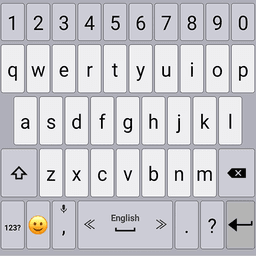
Screenshots
About Classic Big Keyboard
Looking for a big keyboard app that puts typing control back in your hands? Classic Big Keyboard delivers large, responsive keys paired with powerful customization tools designed to make typing faster, easier, and more enjoyable on your Android device.
Tailor every aspect of your typing experience to match your preferences. Adjust key size and font to suit your vision and comfort level, then fine-tune typing sounds and vibration intensity to create the perfect tactile feedback. Whether you prefer loud clicks or silent taps, gentle vibrations or strong pulses, your keyboard adapts to you. Speed up your workflow by customizing delete speed, using volume buttons to navigate the cursor, or enabling double-space-to-period shortcuts for hands-free efficiency.
Type with confidence using intelligent dictionary and grammar features. Benefit from accurate word predictions and auto-corrections that learn your typing patterns, while custom shortcuts let you insert frequently used phrases with just a few taps. Advanced typing modes—including swipe typing for fluid input and voice typing for hands-free dictation—give you multiple ways to compose messages and documents.
Personalize your keyboard's appearance with a stunning collection of themes, each crafted to enhance usability and style. Access the latest emoji keyboard with resizable display options, making it simple to find and insert emojis quickly. Premium users can set custom background photos to create a truly unique keyboard design that reflects their personality.
Gesture controls add another layer of speed and convenience. Swipe the spacebar left or right to switch languages instantly, long-press keys to reveal hidden symbols, or create custom gestures for frequent actions. Hold the emoji button to open a text-based emoji popup for rapid selection.
Classic Big Keyboard supports 50+ languages across multiple scripts—from English and Spanish to Arabic, Hindi, Thai, and beyond. Switch between languages seamlessly with spacebar gestures, making it ideal for multilingual users and travelers.
Whether you're typing emails, crafting messages, or writing longer documents, Classic Big Keyboard combines accessibility with power. Experience responsive, customizable typing that works the way you want, every time you reach for your device.
Pros & Cons
Pros
- Extensive customization options for keys, sounds, vibration, and appearance
- Supports 50+ languages with seamless switching via spacebar gestures
- Multiple input methods including swipe typing and voice dictation
- Intelligent predictions and auto-corrections that learn your typing patterns
Cons
- Premium features like custom background photos require paid subscription
- Gesture controls and advanced modes may require time to learn effectively
- Keyboard customization stored locally; no cloud sync across devices mentioned
- Voice typing functionality depends on reliable internet connection
Related Apps

HWiNFO
Hardware monitoring for Windows—track CPU temp, GPU load, fan speed, voltage in real time.

TransMac
Read Mac drives and DMG files on Windows. Access APFS/HFS+ storage and create disk images.

Advanced SystemCare Free
System optimization tool: clean, repair, and secure your PC. Remove malware, fix errors, and boost performance.

Display Driver Uninstaller (DDU)
Driver uninstaller for GPU and audio — removes residual files for clean Windows updates

Glary Utilities
PC maintenance and optimization suite — clean, repair, and speed up your Windows computer in one action.

Universal ADB Drivers
ADB drivers for Android: Connect any smartphone to Windows PC without manufacturer software.
Latest Articles

Melhores aplicativos para pequenos modelos de codificação local em desktop em 2026 (7 que superam os gigantes)
Jul 26, 2026
Melhores aplicativos para firewall crowdsourced de homelab no desktop em 2026 (7 que bloqueiam ataques desde o primeiro dia)
Jul 26, 2026

Melhores alternativas para Nekotina no desktop em 2026 (7 bots de anime Discord para servidores de RPG)
Jul 26, 2026

Melhores alternativas ao Mistral em 2026 (7 aplicativos de chat de IA que testamos contra o Vibe)
Jul 26, 2026
Melhores alternativas ao Hydra para Discord desktop em 2026 (7 bots de música que ainda funcionam)
Jul 26, 2026